Jenny Mod compatibility: which Minecraft versions it works on
The original mod targets one version: Java 1.12.2 with Forge. Anything newer is a community port by someone else. Here is exactly what exists, what each needs, and how strong the evidence is.
New to the mod? Start with our Jenny Mod for Minecraft guide. Looking for the file? Go to the Jenny Mod download section.
Version matrix
Search results promise support for "every version from 1.12.2 to 1.21". The evidence does not support that. The table below lists every edition and version we checked, with an honest status for each.
| Edition | What exists | Needs | Status |
|---|---|---|---|
| Java 1.12.2 | Original mod The version every source agrees on. We have not installed and run it yet. | Forge 14.23.5.2859 (Recommended) Java 8 | Confirmed in sources |
| Java 1.20.1 | No original build found We found only separate third-party projects, such as "Jennycraft", which is described as a rewrite. | — | Nothing found |
| Java 1.21.1 | Community ports Fan reconstructions on GitHub, not the original mod. Requirements come from their READMEs. | NeoForge 21.1.x + GeckoLib Java 21 | Verification in progress |
| Bedrock Windows, Android, iOS | Independent add-ons Separate adaptations by other authors. The Java mod itself cannot run on Bedrock. | .mcaddon / .mcpack | Verification in progress |
| Console Xbox, PlayStation, Switch | Not supported Consoles cannot import add-on files. | — | Not possible |
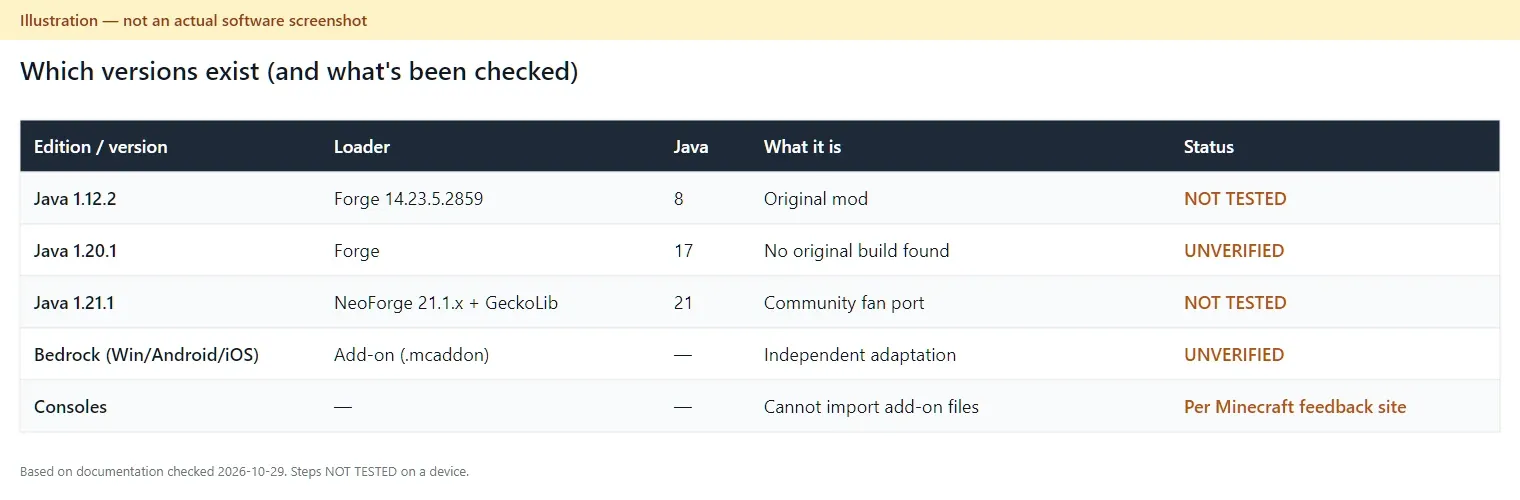
Java 1.12.2: the original mod Confirmed in sources
Every source we checked agrees that the original Jenny Mod is a Forge mod for Minecraft Java Edition 1.12.2, so playing the Jenny Mod on PC (Windows, macOS or Linux) means this setup. Its requirements are:
| Minecraft | Java Edition 1.12.2 |
|---|---|
| Mod loader | Minecraft Forge for 1.12.2. Use the Recommended build 14.23.5.2859 (listed 11 Dec 2021), not the "Latest" build (14.23.5.2864, listed 3 Dec 2025). Checked daily against files.minecraftforge.net. |
| Java runtime | Java 8, 64-bit. Newer Java versions are a frequent cause of Forge 1.12.2 crashes. |
| File type | A single .jar file. A commonly cited name is Jenny-Mod-Forge-1.12.2-v1.9.0.jar, but sites list different sizes for it, so treat every copy as a different file until its hash is checked. |
Forge marks one build per Minecraft version as "Recommended", meaning it has been stable for a long time. Older mods are usually built and tested against it.
How to install on Java 1.12.2
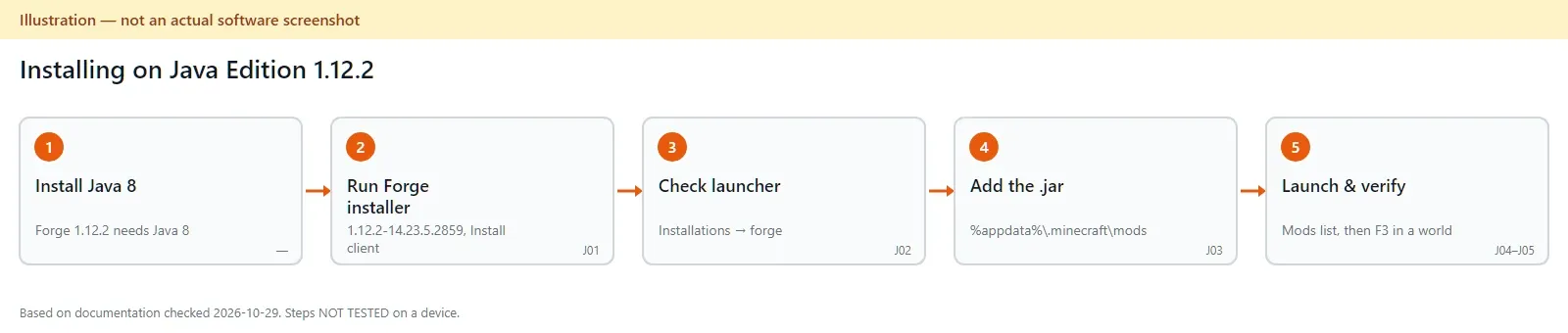
These steps follow the official Forge workflow and download site. Step-by-step screenshots are being added as each step is verified.
- Install Java 8 (64-bit). Forge 1.12.2 expects it.
- Download the Forge installer. Go to
files.minecraftforge.net, choose 1.12.2, and under Download Recommended click Installer. The site then shows an ad page: click Skip in the top-right corner and nothing else. - Run the installer. Keep Install client selected, click OK and wait for the success message.
- Check the launcher. Open the Minecraft Launcher and go to Installations. A forge profile should now be listed.
- Add the mod. Put the mod's
.jarfile into themodsfolder (see below). Create the folder if it does not exist. Do not unzip the jar. - Launch and confirm. Start the forge profile and open Mods on the title screen. The mod should be listed. In a world, press F3 to confirm you are on 1.12.2.
Where is the mods folder?
| System | Location | Shortcut |
|---|---|---|
| Windows | %appdata%\.minecraft\mods | Win + R, type %appdata%\.minecraft |
| macOS | ~/Library/Application Support/minecraft/mods | Finder → Go → Go to Folder |
| Linux | ~/.minecraft/mods | Show hidden files (Ctrl + H) |
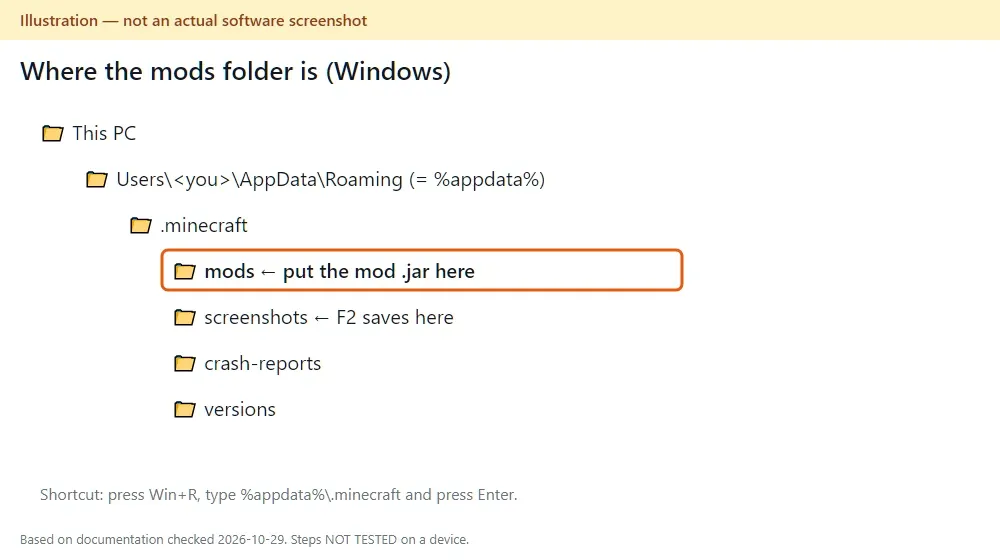
Copy your saves folder somewhere safe before adding any mod. If you also play modern versions, give the Forge 1.12.2 profile its own game directory in the launcher, so 1.12.2 mods never mix with mods for other versions.
Java 1.20.1 Nothing found
We found no original Jenny Mod build for 1.20.1. What does exist are separate third-party projects, such as "Jennycraft" (described by its publisher as a rewrite of Fapcraft) and an "Ellie Mod" listed for 1.20.1 and 1.12.2. They are different mods by different people. Any page offering "Jenny Mod 1.20.1" should name the actual author and project it is distributing. If it doesn't, treat the file as unverified.
The same applies to searches for Jenny Mod 1.20, 1.16.5 or 1.19.2: every source places the original on 1.12.2, so a file labelled for one of those versions is a different project, not an update.
Java 1.21.1: community ports Verification in progress
Several fan projects on GitHub attempt to bring the mod to 1.21.1 on the NeoForge loader. One describes itself as "reconstructed from the 1.12.2 FapCraft.jar". These are community ports, not the original mod. Their READMEs list these requirements:
- Minecraft Java 1.21.1
- NeoForge 21.1.x (one port cites 21.1.242, another 21.1.84 or newer)
- GeckoLib for NeoForge 1.21.1 (4.7.4 or newer)
- Java 21
Here is where each port stands right now:
| Port (GitHub) | Status | Last activity | Latest release |
|---|---|---|---|
Mine335/JennysMod1.21.1 | Active | 6 Aug 2026 | v1.1.0 (6 Aug 2026) |
arnzbo123/goodmod | Active | 9 Oct 2026 | None (build from source) |
Angina830/Jenny-mod-1.21.1 | Archived | 27 Aug 2026 | Final-Update (27 Aug 2026) |
Monitored daily on GitHub. Last change detected 30 October 2026. A GitHub release is not a safety check. Hash and scan any port file before opening it.
Use a separate game directory for 1.21.1 and never mix its files with the 1.12.2 jar.
A repository claiming "Jenny Mod for all versions" contained malware instead of a mod. A genuine Java mod is a .jar. If you get an .exe, .bat or a password-protected archive, delete it. Details.
Fabric, the CurseForge app and Education Edition
- Fabric: we found no Fabric build of the original mod. Treat a "Jenny Mod Fabric" download as unverified unless it names its author and source.
- CurseForge app: CurseForge is a mod-hosting platform and launcher. Forge is the mod loader. They are different things. More on listings.
- Education Edition: it is based on Bedrock, so Java Forge mods cannot run on it.
- TLauncher and other launchers: a Forge 1.12.2 profile in any launcher needs the same jar, Java 8 and mods folder. Unofficial launchers carry their own risks.
Back up your worlds first
Adding or removing any mod can change a world for good, so take a copy first. It takes a minute:
- Close Minecraft completely. Copying a world while it is open can give you a broken backup.
- Open your game folder (
%appdata%\.minecrafton Windows, see the paths above) and copy thesavesfolder. Each world is one folder inside it. - Store the copy somewhere else, such as another drive or cloud storage, and name it with the date.
- To restore, close the game and copy the world folder back into
saves.
Multiplayer and servers
Forge mods that add new characters must run on both sides: the server and every player's game.
- Install the server: run the same Forge 1.12.2 installer, choose Install server, and pick an empty folder.
- Start it once, then open
eula.txtin that folder and changeeula=falsetoeula=trueto accept Minecraft's EULA. - Add the mod: put the same
.jarin the server'smodsfolder. The server needs Java 8 as well. - Match every player: each player needs Forge 1.12.2 and the identical mod file. Comparing SHA-256 hashes is the quickest way to be sure.
If versions don't match, Forge refuses the connection and lists the mods that differ. Behaviour of this specific mod on a server is part of our ongoing verification.
How to uninstall the Jenny Mod
- Back up your worlds. Characters and items the mod added disappear once it is removed.
- Close the game and remove the
.jarfrom yourmodsfolder. Moving it out instead of deleting it makes it easy to undo. - Optional, to remove Forge too: delete the forge installation in the Minecraft Launcher, then the Forge folders in
.minecraft\versionsand.minecraft\libraries et\minecraftforge. - Open a world that used the mod: Forge may warn that the world contains entries from a missing mod. Try it on a backup copy first.
A genuine mod never needs an installer program. If you ran one, uninstall it from your system's app list and run a full malware scan. What to do next.
Our test results
File hashes, malware-scan results and device tests appear here as soon as each check is complete. Until then, every step on this page is built on official documentation and labelled exactly that way.