Jenny Mod not working? Find the fix step by step
Most problems come down to four things: the wrong Java version, the wrong folder or profile, mods for different Minecraft versions mixed together, or a file that isn't really the mod. Answer the questions below.
New to the mod? Start with our complete Jenny Mod guide. Looking for the file? Go to the Jenny Mod download section.
These fixes follow Forge and Microsoft documentation and reports from the modding community. We will mark each fix "tested" once we reproduce the error ourselves.
Interactive troubleshooter
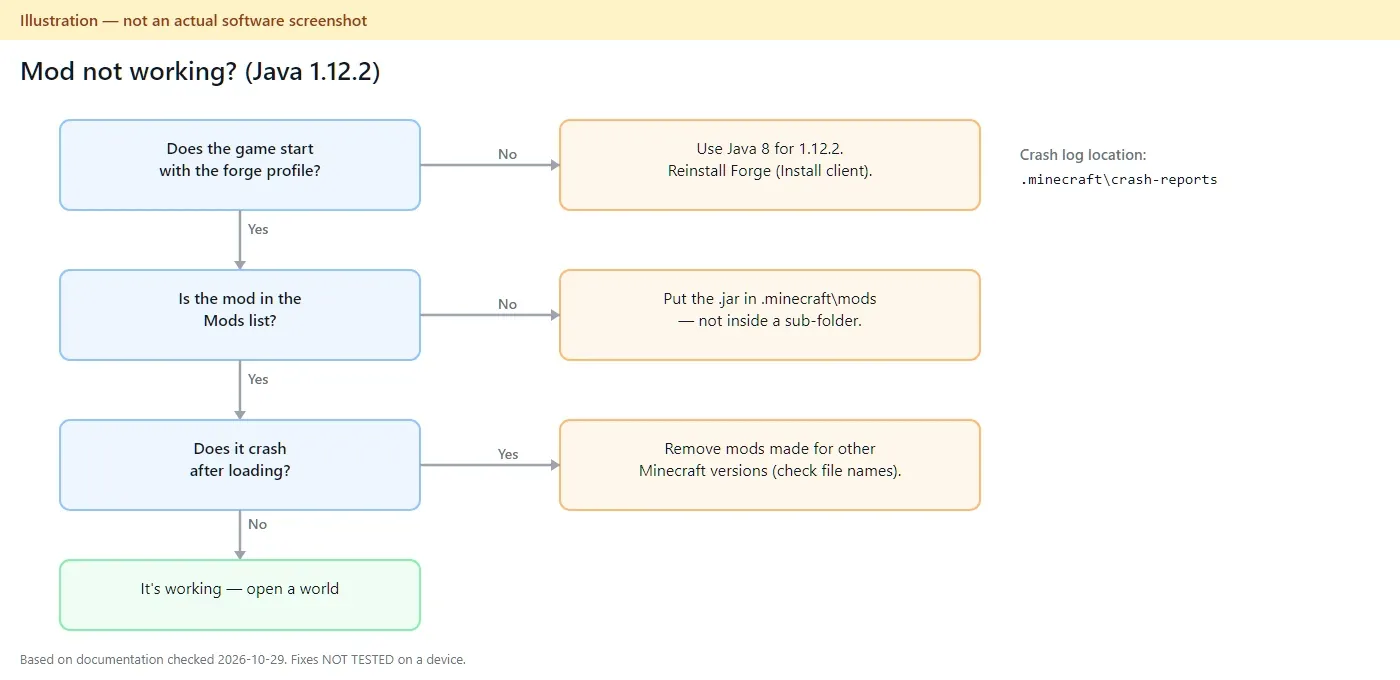
Open the question that matches what you see.
Which edition are you on: Java or Bedrock?
Java: the game won't start with the forge profile
Most likely cause: the wrong Java version. Forge 1.12.2 expects Java 8.
- Install Java 8 (64-bit).
- In the launcher, edit the forge profile → More options → Java executable, and point it at Java 8's
javaw.exe. - If it still fails, run the Forge installer again with Install client.
Java: Minecraft starts, but the mod isn't in the Mods list
- Check that you launched the forge profile, not "Latest release".
- The
.jarmust sit directly in.minecraft\mods, not in a subfolder and not unzipped. - If you gave the profile a custom game directory, the
modsfolder must be inside that directory. - Make sure the file really ends in
.jar. Windows hides extensions by default, so turn on File name extensions in Explorer.
Java: it crashes after the loading screen
- Remove every mod that is not built for 1.12.2. Mods for 1.16, 1.19, 1.20 and so on will crash a 1.12.2 game.
- Test with only Forge and this one mod. Then add your other mods back one at a time.
- Read the newest file in
.minecraft\crash-reports(how to read it).
Java: I'm on 1.20.1 or 1.21.1
There is no original build for those versions. 1.21.1 ports need NeoForge (not Forge), GeckoLib and Java 21. A 1.12.2 jar will never load on 1.21.1. Port requirements.
Bedrock: the file won't import, or the pack is missing
- The file must end in
.mcpackor.mcaddon. Rename a.zipback, and never use an.apk. - On Windows, if it opens in Word, use Open with → Minecraft.
- A greyed-out pack usually needs a newer Minecraft version.
- Remember the Java mod itself can't run on Bedrock. Why.
Either: the download contains an .exe, .bat, .apk or a password-protected archive
Stop. Do not open it. No Minecraft mod or add-on needs any of these. Delete the file and, if you already ran it, scan your device and change your passwords. Read the safety guide.
Java error table
| Symptom | Likely cause | Fix |
|---|---|---|
| Crash right at launch | Java 17/21 used for 1.12.2 | Use Java 8 |
| No "forge" profile in the launcher | Forge installer not run, or "Install server" chosen | Rerun the installer with Install client |
| Mod missing from the Mods list | Wrong folder, wrong profile, or file not a .jar | Check .minecraft\mods and launch the forge profile |
| Crash after the loading screen | Mods for other versions in the folder | Keep only 1.12.2 mods |
| "Duplicate mods" error | Two copies of the same jar | Keep one copy |
| Game is slow or freezes | Low allocated memory with many mods | Remove other mods first, then raise memory in JVM arguments if needed |
Reading a crash report
When Forge crashes, it writes a text file to .minecraft\crash-reports. Open the newest one and look for:
- "Description:" near the top, a one-line summary of what failed.
- The first lines under "Stacktrace", which often name the mod that caused the crash.
- In the mod list near the bottom, any mod whose name shows a version other than 1.12.2.
For errors before a crash report is written, check .minecraft\logs\latest.log.
Bedrock and mobile problems
Import, activation and file-type problems are covered in the Bedrock guide's problem table.
Slow, stuttering or out of memory? RAM and performance
This is general Minecraft and Forge guidance, not specific to this mod.
- Check how much memory Minecraft gets. In the Minecraft Launcher, open Installations, edit the forge profile, select More options and find
-Xmx2Gin JVM arguments. That 2 GB is the default. - Raise it a little if needed. For Forge 1.12.2 with a handful of mods,
-Xmx3Gor-Xmx4Gis usually plenty. Large modpacks need more. - Don't overdo it. Keep it to about half of your computer's RAM. Giving Java too much can cause longer pauses, not fewer.
- Use 64-bit Java 8. 32-bit Java can't use more than about 1 GB, whatever you set.
- Lighten the load: lower render distance, close browsers and other heavy apps, update your graphics driver, and remove mods you don't use.
On phones and tablets (Bedrock), lower render distance and close background apps. Add-ons that spawn many characters can slow down older devices.
Before you ask for help
Anyone helping you will need these details, so collect them first:
- Edition and exact version (Java 1.12.2, Bedrock 1.21.x…)
- Loader and version (Forge 14.23.5.2859, NeoForge 21.1.x…)
- Java version
- The exact file name of the mod and where you got it
- Your full mods folder list
- The crash report or
latest.log